Useful things

Tools that came from a real need.

A shelf of practical systems built because the right tool did not exist yet.

Tool 01

NutriTrack

A private, daily-use nutrition and weight system where AI is woven into the actual decision loop.

Why it exists

NutriTrack was built for friends and family, because the existing apps either wanted a subscription, wanted to sell the data along with the ads, or treated consistency like a scolding problem.

It tracks food, weight, streaks, goals, reports, and trends without guilt, shame, or manipulative engagement mechanics.

Key features

  • Food logging with USDA database search, quick-add staples, and full history search.

  • Photo food analysis: point your camera at a meal or label and Nora reads it.

  • Weight logging with trend charts, day-over-day deltas, and weekly averages.

  • Streak tracking and an achievement badge system across five categories.

  • Daily, weekly, and overall email reports with full nutrition and badge history.

  • Weather-aware, mood-aware AI motivation on the dashboard and after every weigh-in.

  • Flexible macro targets for calories, protein, fat, and carbs.

Nora, the NutriTrack assistant

Meet Nora

Context before advice.

Nora analyzes food photos, offers real-time opinions on what you are about to log, and can help correct a meal before it becomes part of the record.

She also shows up on the dashboard every morning and after every weigh-in with something worth reading. She knows the user’s goals, progress, recent meals, weight, trends, streak, mood, activity, and current local weather, and she is tuned to respond supportively, never with shame or criticism.

The food loop

  1. CaptureSearch, quick-add, scan a label, or take a food photo.
  2. EvaluateSee calories, macros, day impact, warnings, and tradeoffs before saving.
  3. Ask NoraGet a context-aware read on whether the entry fits the day and what to change.
  4. Log and learnSave it, then let reports, trends, badges, and summaries compound over time.
Tool 02

QF Code

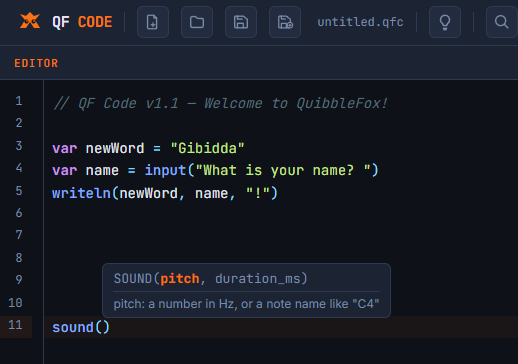
QF Code is a beginner-friendly, browser-based programming language designed to make learning to code less hostile at the start. It borrows the approachable ramp of classic BASIC, but uses cleaner modern syntax that transfers more naturally to contemporary languages.

It runs in the browser with no installation, no compiler setup, and no runtime to configure. The language includes the pieces beginners need to learn real programming concepts: variables, constants, conditionals, loops, functions, arrays, pattern matching, and error handling.

Inside QuibbleFox, QF Code becomes part of a teaching environment: a programming language plus an AI coach that can explain mistakes, give examples, and help the learner build the small version first.

View QF Code on GitHub β†—
QF Code editor showing beginner-friendly code
Under the hood

Simple parts, used with intent.

The technical details matter because the construction is part of the story. The tools here are compact systems, not imitations of venture-backed products.

NutriTrackFood logging, weight trends, daily context, badges, summaries, AI-assisted photo entry, and contextual support through Nora.
QF CodeLexer, parser, evaluator, language spec, browser shell, and example programs.
QuibbleFoxEducation platform with AI coaches for Ukrainian, Spanish, and programming.
BiasBuild small, make it useful, then polish what survives actual use.